
Featured

GlusterFS

Overview

  • What is GlusterFS?
  • Terms
  • GlusterFS volume Type
  • Accessing Data – Client
  • Other feature
  • Use Case

What is GlusterFS?

  • Distributed scalable network filesystem
  • Automatic failover
  • Without a centralized metadata server – Fast file access
  • No Hot-Spots/Bottlenecks – Elastic Hashing Algorithm
  • XFS file system format to store data (ext3,ext4,ZFS,btrfs)
  • NFS, SMB/CIFS, GlusterFS(POSIX compatible)
  • How Does GlusterFS Work Without Metadata?
    • All storage nodes have an algorithm built-in
    • All native clients have an algorithm built-in
    • Files are placed on a brick(s) in the cluster based on a calculation
    • Files can then be retrieved based on the same calculation
    • For non-native clients, the server handles retrieval and placement

Term

Elastic Hashing Algorithm

Every folder in a volume is assigned a equal segment of the 32bit number space across bricks.
for example, each folder across 12 bricks, –
brick1 = 0- 357913941
brick2 = 357913942 – 715827883
brick3 = 715827884 – 1073741823
…brick12 = 3937053354 – 4294967295
Every folder and sub-folder gets the full range, 0 – 4294967295.

The EHA hashes the name of the file being read | written.
ex) ………\GlusterFSrules.txt = 815827884
We use the Davies-Meyer hash.

The file is read | written on the brick that matches the path and filename hash.
The avalanche effect of a hashing algorithm prevents hotspots.
Regardless of the similarities between filenames/path the hash result is sufficiently different.
Additional, redundant steps are taken to prevent hotspots.
Adding a brick to a volume updates the EHA graph on each node.
Running a volume rebalance after adding a brick physically moves files to match the new EHA graph. Adding a brick (GlusterFS volume add brick) without running a rebalance results in new files being written to the new bricks and link files being created on first access for existing files. This can be slow and isn’t recommended.

Brick

A brick is the combination of a node and a file system.
ex) Hostname: /Directoryname
Each brick inherits limits of the underlying filesystem(ext3/ext4/xfs)
No limit to the number bricks per node.
Gluster operates at the brick level, not at the node level.
Ideally each brick in a cluster should be the same size.

Cluster – A set of Gluster nodes in a trusted pool
Trusted Pool – Storage nodes that are peers and associated in a single cluster.
Node – A single Gluster node in a cluster.
Self Heal – Self-heal is process of self-correcting mechanism built inside GlusterFS. Self-heal process is initiated when ‘client’ detects discrepancies in directory structure, directory metadata, file metadata, file sizes etc. This detection process is initiated during the first access of such a corrupted directory or files.
Split Brain – This is a scenario which happens in a replicated volume when there is a network partition from the client perspective. Resulting in wrong attributes on files which are essential for ‘Gluster’ for its volume consistency and making files available This results in a manual intervention by user/customer to find the old copy and remove it from the back end. Gluster will then perform a “self heal” to sync both the copies.

GlusterFS volume Type

Distributed
No data redundancy
Failure of a brick results in data access issues
Distributes files across bricks in the volume
Cuts hardware, software costs in half.
Failure of a brick or node results in loss of access to the data on those bricks.
Writes destined to the failed brick will fail.
Redundant RAID, hardware is strongly recommended.

Replicated / Distributed Replicated
Redundant at the brick level through synchronous writes
High availability
N replicas are supported
Replicates files across bricks in the volume
Failure of a brick or node does not affect I/O.
Failure of a brick or node results in loss of access to the data on those bricks.
Writes destined to the failed brick will success.

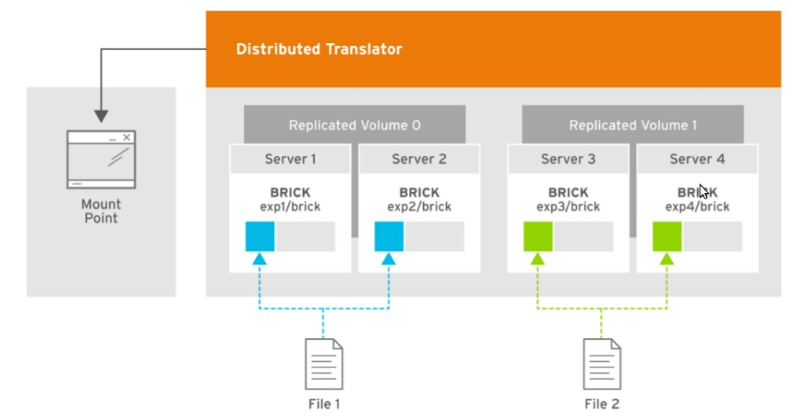
Example of a Two-way Replicated Volume
Example of a Two-way Distributed Replicated Volume

Arbitrated Replicated
High availability and less disk space required
N replicas are supported
Similar to a two-way replicated volume, in that it contains two full copies of the files in the volume. However, volume has an extra arbiter brick for every two data bricks in the volume
Arbiter bricks do not store file data, only store file names, structure, and metadata.
Arbiter bricks use client quorum to compare metadata on the arbiter with the metadata of the other nodes to ensure consistency in the volume and prevent split-brain conditions

Example of a dedicated configuration
Example of a chained configuration

Dispersed / Distributed Dispersed
Erasure Coding(EC)
Limited use case(scratch space, very large files, some HPC)
Problems with small files
Disperses the file’s data across the bricks in the volume
Based on erasure coding.
This allows the recovery of the data stored on one or more bricks in case of failure.
n = k + m (n= total number of bricks, k=require bricks, m=out of bricks for recovery)
requires less storage space when compared to a replicated volume

Example of a Dispersed Volume
Example of a Distributed Dispersed Volume

Accessing Data – Client

Native Client
FUSE-based client running in user space.

NFS
NFS ACL v3 is supported

SMB
The Server Message Block (SMB) protocol can be used to access Red Hat Gluster Storage volumes by exporting directories in GlusterFS volumes as SMB shares on the server

Other feature

Geo-replication
Geo-replication provides a distributed, continuous, asynchronous, and incremental replication service from one site to another over Local Area Networks (LANs), Wide Area Networks (WANs), and the Internet

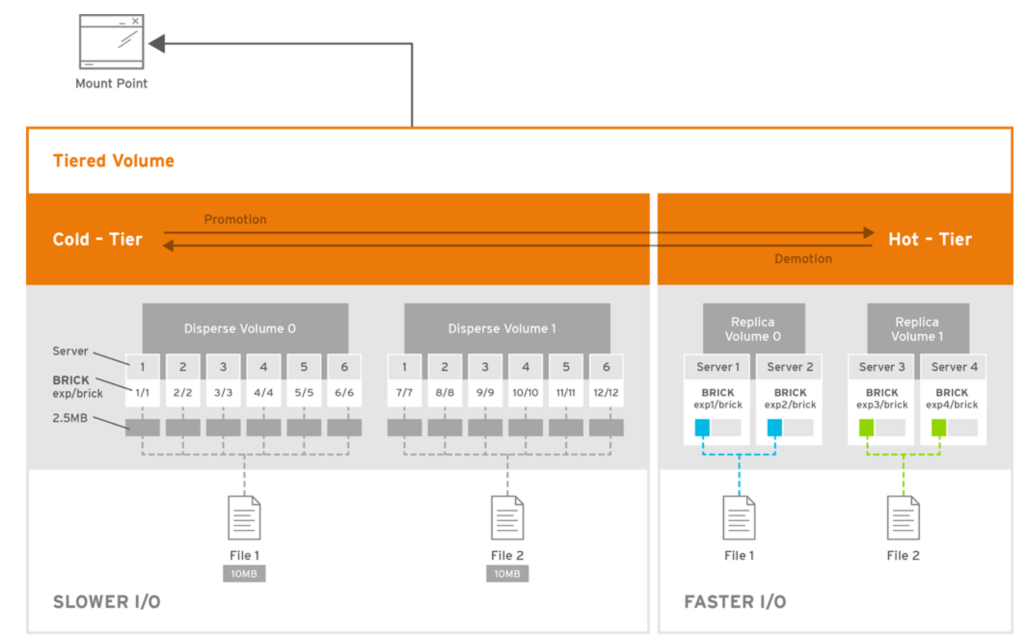
Managing Tiering
Hot tier, cold tier
Security
Enabling Management Encryption
Enabling I/O encrypt ion for a Volume
Disk Encryption
Set up SELinux

Managing Containerized Red Hat Gluster Storage
Used docker

Managing Directory Quotas
set limits on disk space used by directories or the volume
Supported hardlimit, softlimit

Snapshot
enables you to create point-in-time copies
Users can directly access Snapshot copies which are read-only to recover from accidental deletion, corruption, or modification of the data.

Use Case

Data Center / Private Cloud

Global namespace can span geographical distance
GlusterFS file system
Aggregates CPU, memory, network, capacity
Deploys on Red Hat certified servers and underlying storage: DAS, JBOD.
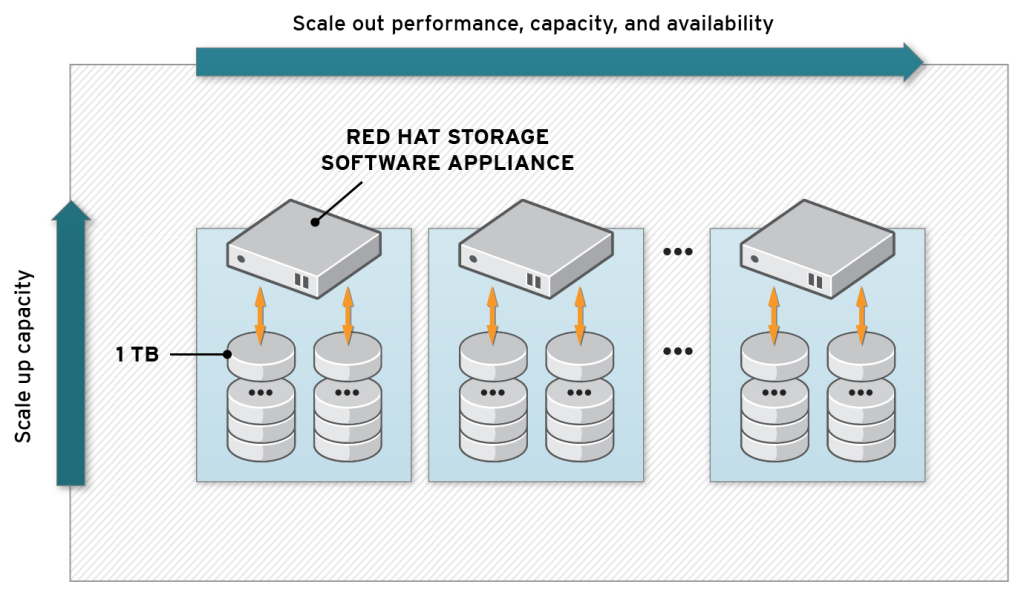
Scale-out linearly; performance and capacity as needed
Replicate Synchronously and Asynchronously for high availability
Scale-out NAS for Amazon Web Services

GlusterFS Amazon Machine Images (AMIs)
The only way to achieve high availability of Elastic Block Storage (EBS)
Multiple EBS devices pooled
In < 1 hour, create a shared, multi-client storage pool on EC2/EBS that scales to 16 PBs of capacity, 100s of MB/s of throughput, and N-way replication across availability zones.
POSIX compliant (no application rewrite required)
No need to rewrite apps
Scale-out capacity and performance as needed

Container-native storage for the OpenShift masses

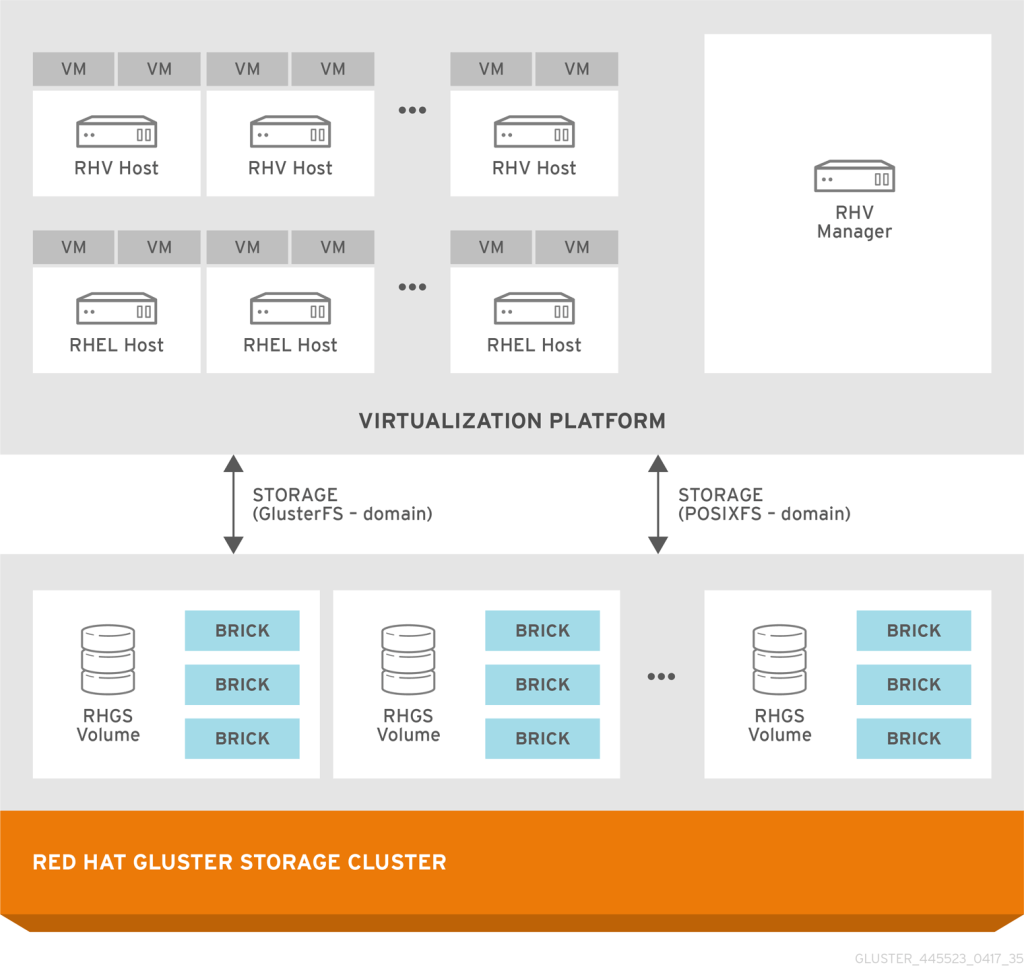
Virtualization integration with Gluster Storage
Why choose Software Defined Storage?

It refers to a storage structure that separates storage software from storage hardware products.

In other words, it is a storage software designed to operate in a standardized environment by removing software dependencies on specific hardware or proprietary hardware.

1. Hardware selection is available

You can either recycle your company’s hardware rather than where you purchased the hardware or build a storage infrastructure using any commercial server. This means that you can use any type of hardware configuration you want.

2. Save your cost.

The configuration and structure of the storage can be configured in a user-defined manner, and thus the capacity and performance can be individually adjusted to reduce the cost for performance.

3. Combine multiple data sources to build a storage infrastructure.

You can network your object platforms, external disk systems, disk or flash resources, virtual servers, and cloud-based resources (even workload-only data) to create unified storage volumes.

4. There is no restriction on configuration.

Traditional storage area networks have limited the amount of nodes (devices using assigned ID addresses) that can be used. Software Defined Storage is unlimited and theoretically scales to infinity.

5. The capacity of the storage can be automatically adjusted according to your requirements

It does not depend on hardware and can be automatically imported from an attached storage volume through automation. Tailor your storage system to your data needs and performance without administrator intervention, new connections, or new hardware.

7th Impossible Open Source Infrastructure Seminar

We attended Open Source Infrastructure Seminar

The Topics of the presentation are as follow:

Basic Concepts and Use Cases of Back-End Storage for Cloud Environments

  • What is Ceph?
  • Ceph Architecture
  • Ceph Components
  • Ceph Storage System
  • Ceph Client
  • Ceph Deployment
  • Use Case

Link PDF File

Basic Concepts and Introduction to GlusterFS, a Distributed File System

  • What is GlusterFS?
  • Terms
  • GlusterFS Volume Type
  • Accessing Data – Client
  • Other Features
  • Use case

Link PDF File

We hope to get a lot of interest and support.

Seminar Information

Basic Concepts and Use Cases of Back-End Storage for Cloud Environments Presentation
Basic Concepts and Introduction to GlusterFS, a Distributed File System Presentation

CEPH­ STORAGE

Overview

  • What is CEPH?
  • Ceph Architecture
  • Ceph Componets
  • Ceph Storage System
  • Ceph Client
  • Ceph Deployment
  • Use Case

What is CEPH?

  • Massively scalable storage system
  • Reliable Autonomic Distributed Object Store (RADOS)
  • Object, block, and file system storage in a single unified storage cluster
  • Object-based Storage

Ceph Architecture

Ceph Componets

OSDs : stores data, handles data replication, recovery, backfilling, rebalancing, provide information to Mons

Monitors : maintains maps of the cluster state,monitor map, OSD map, PG map, CRUSH map

MDSs : stores metadata on behalf of the Ceph Filesystem ( POSIX file system )

OSD Servers(Object Storage Device)

  • Intelligent Storage Servers
  • Serve stored objects to clients
  • OSD is primary for some objects
    • Responsible for replication, re-balancing, recovery
  • OSD is secondary for some objects
    • Under control of the primary
    • Capable of becoming primary

MON Servers

  • Must be an odd number of monitors.
  • Maintain the cluster map
    • MON Map
    • OSD Map
    • MDS Map
    • PG Map
    • CRUSH Map

MDS Servers (Metadate Servers)

  • The Ceph Metadata Server daemon (MDS)
    • Provides the POSIX information needed by file systems that enables
      Ceph FS to interact with the Ceph Object Store
    • It remembers where data lives within a tree
      Clients accessing CephFS data first make a request to an MDS, which provides what they need to get files from the right OSDs
  • If you aren’t running CephFS, MDS daemons do not need to be deployed

Calamari

Calamari is WebUI to monitor a Ceph cluster

Placement Groups (PGs)

  • The cluster is split into sections
  • Each section is called a “Placement Group” (PG).
  • A PG contains a collection of objects
  • A PG is replicated across a set of devices
  • An object’s PG is determined by CRUSH
    • Hash the object name
    • Against the number of PGs configured
  • The PG location is determined by CRUSH
    • According to the cluster state
    • According to the desired protection
    • According to the desired placement strategie

Pools

Pools are logical partitions
Pools Provide the following attributes:
– Ownership/access
– For each protection type respectively
– Number of placement groups
– CRUSH placement rule

PGs within a pool are dynamically mapped to OSDs
Two types of pools
– Replicated (historical default)
– Erasure Coded (EC Pools)

Native Protocal (LIBRADOS)

Pool Operations
Snapshots and Copy-on-write Cloning
Read/Write Objects – Create or Remove
Create/Set/Get/Remove XATTRs (Key/Value Pairs)
Compound operations and dual-ack semantics
Object Classes

Ceph Storage Cluster

The foundation for all Ceph deployments

  • Ceph Monitor
    maintains a master copy of the cluster map
  • Ceph OSD Daemon
    stores data as objects on a storage node

Ceph Block Device

Ubiquity of block device interfaces makes a virtual block device an ideal candidate to interact

  • kernel modules, KVMs such as Qemu, integrate with Ceph block devices
  • Snapshots – create snapshots of the images to retain a history of an image’s state
  • RBD Mirroring – asynchronously mirrored between two Ceph clusters
  • Librbd

Ceph Rados Gateway

Object storage interface emulating both Amazon S3 and Openstack Swift.

  • Accessible through a ReST-ful HTTP interface
  • ReST APIs for Amazon S3 and OpenStack Swift protocols
  • Supports Regions, Zones, Users, ACLs, Quotas etc.. similar to S3/Swift
  • RGW nodes spanning multiple geographical locations (Federated Gateways)

Ceph Filesystem

POSIX-compliant filesystem that uses a Ceph Storage Cluster to store its data

  • Ceph Filesystem requires at least one Ceph Metadata Server
  • Client – Mount CephFS as ceph-fuse, mount.ceph
  • Client has network connectivity and the proper authentication keyring.

Ceph Client

Block Device(RBD)
block devices with snapshotting and cloning kernel objects (KO) and a QEMU hypervisor that uses librbd

Object Storage(RGW)
RESTful APIs with interfaces that are compatible with Amazon S3 and OpenStack Swift

Filesystem(CephFS)
POSIX compliant filesystem usable with mount, filesytem in user space (FUSE).

Ceph Deployment

  • Puppet
    maintained through the OpenStack community
  • chef
    Installation via Chef cookbooks is possible
    Chef cookbooks initially developed by Inktank
  • ansible
    Installation via Ansible is possible
  • juju
    developed by Clint Byrum
  • crowbar
    Ceph barclamps for Crowbar exist and are actively maintained(upstream repository)

Use Case

  • Integrating Ceph with OpenStack
    provides all-in-one cloud storage backend for OpenStack
  • Using Intel® Optane™ Technology with Ceph* to Build High-Performance OLTP Solutions
워드프레스닷컴으로 이처럼 사이트 디자인
시작하기